Friday, March 9, 2012

Have a Christmas Stamp? Make a Sympathy Card!

Uh, what?  I know, I know.  Crazy title, right?  Well, that's exactly what I did -- I made a sympathy card using a Christmas stamp.  I thought the image would be perfect, and it was.


The husband of my son's first teacher at his day care center recently lost his long battle with cancer.  This particular teacher was very fond of my son and is an all-around wonderful lady.  Even though my son has been out of her class for over two years now, I felt that I needed to send her something to show our sympathy and support.

I also decided to make this card for the Cricut Circle Magazine's monthly challenge.  The February challenge was a sketch challenge: 

"We are so excited about our challenge this month! Sketches are all the rage and there are so many to choose from, especially in the Circle Magazine and on the Circle Blog. To celebrate all of our designer’s sketching ability, we want to give you the opportunity to choose a sketch and create a project with it. You can use any of the sketches from the Cricut Circle Magazine or on the Cricut Circle Blog to create a card, layout, decor item… whatever you are inspired to make." 

I used this sketch from a post on the Cricut Circle Blog way back on December 10, 2010.  It was designed by Jana Eubank.


So with my sketch in hand and my game plan in mind, I set to work, resulting in a complete and utter failure.  The colors weren't right, the sizing was off, I didn't like the images I chose -- it just didn't work.  So I scrapped it and went to bed.  The next day I played with the design using my Gypsy and rethought my color choices.  I ran to Michael's to find the right ribbon and crossed my fingers.  Success!

The background paper is a shimmery steel gray color.  I used silver embossing powder for the image.  The stamp is a Christmas stamp from Stampin' Up!  I used masking tape to block the Christmas sentiment when stamping.  The paper and the image have a very nice sheen to them.  It was hard to capture the shine in a picture, but you can get an idea of it from this image:


I was afraid the gray and the black in the ribbon would be too dark, especially for a sympathy card, but it turned out beautifully!  (I should really work on my photography skills so you can get a true sense of the colors of the card...)  The white center shape is the eyelet shape from the Elegant Edges Cricut cartridge.  I stretched its size with my Gypsy so that it is approximately 4 inches tall and 6 inches wide.  I left the inside of the card blank and wrote a note from our family to the teacher's family.

This card was nothing like I had originally envisioned.  I didn't put the planned sentiment on the front.  The colors of the paper and the image embossing are different than what I first tried.  And where did that bow come from?!  But in the end, I am very proud of this card and I believe that the teacher will appreciate it.

Thank you for visiting, and please come back again!

Tuesday, February 21, 2012

Valentine's Day Cards

I wanted to share pictures of the Valentine's Day cards I made for my son's daycare class.  It is very simple, as I figured all that the 3 and 4 year old kids would notice is the candy on the front!


I used my Cricut Anniversary Edition E2 to make these.  The bee is from the Create A Critter cartridge.  I added silver Stickles to the antennae and used chalk to give the bee his rosy cheeks.  The yellow paper has a texture to it that is not really noticeable in the picture.  The wings are made from glitter paper.  The textured paper and the glitter paper are from DCWV.

Here is the inside of the card:


The heart is from the Cake Basics cartridge and the letters are from the Pooh Font cartridge.  The heart is made with the textured paper also.  The "Bee Mine" is cut out of the heart to let the red show through.  I'm glad I figured out that would be easier than gluing the letters to the heart!  After I glued down the first heart however, I realized the inside of the "B" would be lost.  So to fix that, I lifted my "B" from my cutting mat with the inside pieces still in place.  I added glue to the back of the inner pieces and laid the entire "B" back into its cutout in the heart.  Then I removed the "B".  The inner pieces stayed in place and defined the cutout "B".  I used a rubber stamp I had in my stash for the sentiment.

I hope you had a great Valentine's Day.  I enjoyed a delivery of chocolate-dipped fruit from Edible Arrangements.  Boy were they good!

Thank you for visiting!  See you again soon!

WOW! It's Been a LONG Time!

Hello, hello!  First off, I want to thank all of my faithful followers who have stuck with me through my hiatus.  I really didn't intend to be gone for so long.  But you know how it is, once you fall off the wagon, it's so hard to get back on it!

I am going to try my BEST to post at least once a week.  That means I'd better get crafting!  I haven't really made much during my time away.  (Hmmm, now that I think about it, maybe I'll start with posting every other week!)  I do have some past creations that I've never posted, so I will share those with you.  I hope you don't mind.

So, without any further ado, welcome back to Riley's Custom Creations!

Monday, June 6, 2011

Butterfly Card


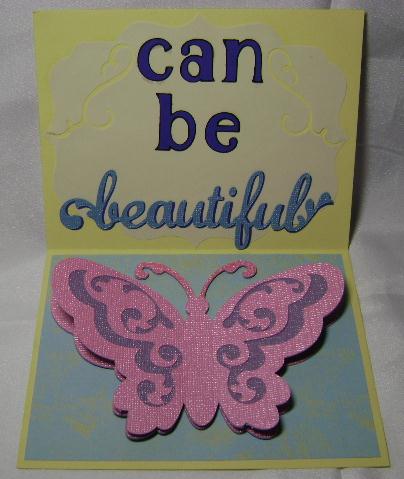
I made this card just because.  The idea popped in my head one night and I had to make it.  I don't have any one to give it to at this time, or even an event that is coming up that might lend itself to using this card.  But when inspiration strikes, I must follow through with it.  Especially since I haven't created much lately.

This card uses 6 different Cricut cartridges: Alphalicious, Elegant Cakes, Elegant Edges, Quarter Note, Walk in My Garden, and Wall Decor and More.  I used chalk to accent the caterpillar.  I cut two of the butterflies and glued them together at the body.  There are dimensionals between the wings to give them a little lift.  The "beautiful" cut does not have a shadow layer, so I cut another one out of dark blue paper and offset the two.  I think this makes it a bit easier to read.  I am really pleased with the final result.

I designed this card on Design Studio.  As I finished it up and was saving it so I could transfer it to my Gypsy and then cut it with my E2, my Design Studio crashed and I lost it all!  Luckily I had been jotting down notes as I compared images to decide which ones I wanted to use, so I was able to recreate it pretty quickly, except for the lettering, since I had stretched those to the size I liked.  So what did I learn from this experience?  Just like with any computer program, SAVE, SAVE, SAVE!!

Thank you for visiting and have a great day!